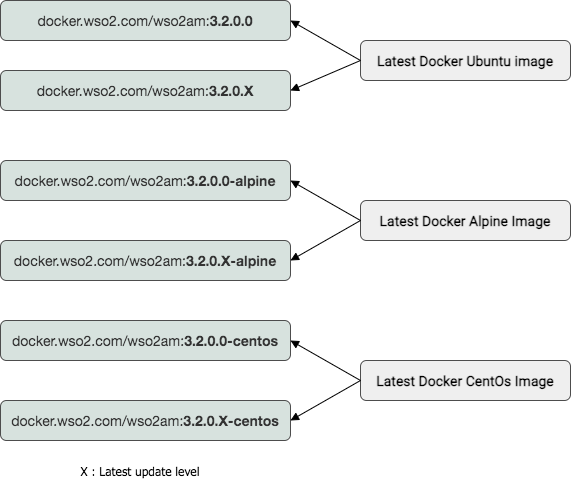
Docker image tags with Updates 2.0
Image Tagging with Choreo Labs Updates 2.0
All the Docker images packaging basic Updates for the relevant product profiles (except Hotfixes) are hosted in Choreo Labs private Docker registry.
The docker images in the Docker Private Registry does stay in a special tagging format
{CHOREO_PRODUCT_VERSION}.{UPDATE_LEVEL}-{OS_PLATFORM}
CHOREO_PRODUCT_VERSION : displays the product version.
UPDATE_LEVEL : displays update level.
OS_PLATFORM : OS platform is shown (Images created for alpine and centos is shown as '-alpine' and '-centos' respectively. But Linux Ubuntu images are the default base OS and are not tagged specifically)
For example, if Choreo Labs API Manager version 3.2.0 has a product Update level of 10, the relevant Alpine Linux based container image will include the following tags:
apim.3.2.0.10-alpine
It's good to know the difference between unique and special tags used in the updated docker images: lets take the same example - apim.3.2.0.10-alpine
CHOREO_PRODUCT_VERSION : apim.3.2.0
UPDATE_LEVEL: 10
OS_PLATFORM : alpine
According to the above example update level of this docker image is 10, which is a unique tag getting you to a specific update level. A special update tag 0 can also be used to stay on the latest update level.